

Your game is safe
Tap a promise to see what makes it true
Nothing changes without your OK
The plugin only reads. A change happens only when you press Fix it and approve the exact change it shows you. The plugin is built so that nothing else in it can edit scripts.
Every fix can be undone
Before a fix changes anything, PlaySight saves a copy of what it replaces. One click (Undo PlaySight's last fix) puts it back. Studio's own Undo works too.
Can't touch your live game
The plugin has no code that publishes or saves to Roblox; its build refuses any. The analytics key PlaySight asks for can only read numbers, for one game. PlaySight checks that with Roblox and refuses any key that can do more.
We never spend your money
The Ads Coach writes ad plans and checks your campaigns; you run them yourself in Roblox's Ads Manager. PlaySight has no code that creates or pays for a campaign. If launching from PlaySight comes later, it will show the exact budget and wait for your OK.
Your game file stays with you
The plugin sends a summary: your screens, buttons, prompts and settings. Your script code only if you say yes, and you can change that any time.
See exactly what's sent
Preview what's sent in the plugin shows the whole summary before it leaves Studio. You can then send exactly that, or not.
Never shown to other developers
Each game's data is kept separate: the database only lets you see your own games. What PlaySight learns across games (like what makes a good shop screen) comes from public Roblox numbers and screenshots of top games. Never from anyone's code.
Never used to train AI
PlaySight doesn't train AI. Its AI is Claude, through Anthropic's API, whose terms say they may not train models on it (quoted below). The one other AI company is OpenAI: only when you use the Art Studio, the picture brief and your game screenshots go to OpenAI's image API (if you haven't picked any screenshots, your game's public thumbnail or icon from Roblox instead; never your code). OpenAI's API by default doesn't train on API data.
Deleted when you want
Script code is deleted automatically 30 days after it's sent, including code in fixes and reports. Reports keep what was learned: script names, line numbers, and short one-line quotes as evidence. Account → Delete all my data removes everything, at once. Export my data gives you a copy first.
Locked down
HTTPS everywhere. Your data is encrypted where it's stored, and your Roblox key is encrypted again by PlaySight. Payments go through Stripe, so PlaySight never sees card numbers. You can turn on two-factor login in Account.
You control access
Delete the analytics key in Creator Hub any time: it stops working at once. Disconnect the plugin from your game's Settings (or in the plugin), and its token stops working.
Told if anything goes wrong
PlaySight has a written plan for security problems. If one affects you, you're told quickly, on My games and by email, with what happened and what to do.
Studio will ask you two things
- Allow web requests? How the summary and test results reach PlaySight. The only place the plugin sends anything
- Allow editing scripts? Only for one-tap fixes, which you approve first. Say no and everything else still works
Take access back
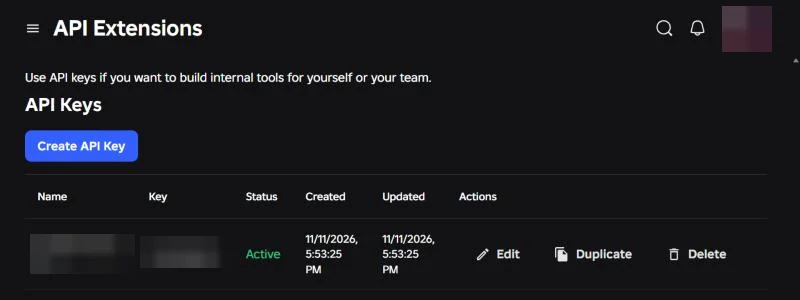
1To take it back: API Extensions ↗ → Delete
2The plugin: your game's Settings → Disconnect on PlaySight
What Anthropic's terms say
“Anthropic may not train models on Customer Content from Services.”
PlaySight's AI is Claude, through Anthropic's commercial API. Commercial Terms of Service, section B (Customer Content), effective June 17, 2025; checked November 11, 2026. Read the terms
If something goes wrong
- We stop it first and cancel any keys or tokens that might be exposed
- We work out who's affected and what data
- We tell you quickly, on My games and by email: what happened and what to do
- We fix the cause, and tell you when it's done
Found a security problem? Email [email protected]. We reply within 3 days.
Your data: Account → Export or Delete all my data